
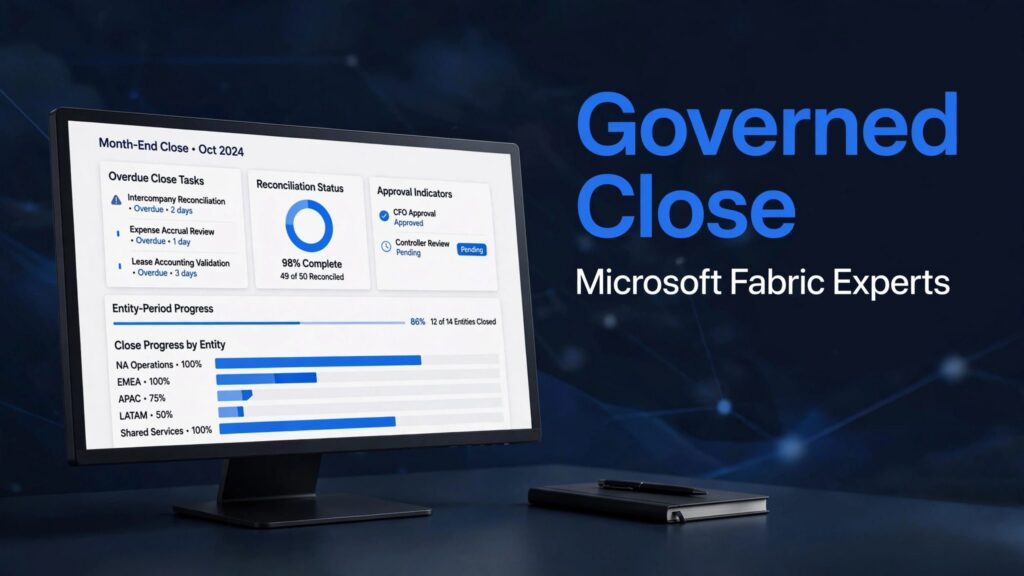
A governed month-end close dashboard connects accounting tasks, reconciled balances, review evidence, and period controls in one Power BI view. Its value comes from trusted completion rules, not the number of charts.
Your controller needs to know what’s late, what’s blocked, and whether financial statements are approved. Start with those decisions, then build the data model and controls behind them.
Key Takeaways
- Set close targets from your own business-day, workload, and adjustment history, and define whether completion means controller approval or ERP period closure.
- Build a repeatable close checklist with an owner, reviewer, deadline, and evidence for each task. Keep year-end closing entries distinct from monthly period locking.
- Store task records separately from ledger balances and reconciliation results, then define financial rules in a governed semantic model.
- Design the dashboard around blockers, overdue work, reconciliation differences, approvals, and entity-period status. Calculate completion from eligible task instances and show blocked or overdue work separately.
- Keep open periods visible in operational reporting, restrict approved financial reporting to authorized closed periods, and test totals, permissions, feeds, evidence, and reopened periods before production.
1. Set a close baseline before choosing targets
The month-end close process is the record-to-report sequence for completing transactions, reconciling accounts, posting adjustments, and approving financial statements.
Benchmarks need context. Nominal’s close automation guide estimates traditional closes at 8 to 10 business days and 120 to 150 manual team hours. It also reports manual error rates as high as 23%.
Meanwhile, Vena’s month-end close checklist cites Ledge findings that 50% of teams take six days or more, while 94% still use Excel. Historical Ventana research cited by FloQast found 58% took seven or more days in 2014.
These aren’t interchangeable targets. Track your own business days, manual hours, reopened tasks, and late adjustments. Use an agreed holiday calendar and define whether completion means controller approval or ERP period closure.
2. Build the month-end close checklist first
Use the checklist as the operational foundation for a repeatable month-end close process. Mercury’s close-process guidance recommends starting with revenue and deferred revenue, followed by cash, payroll, accounts receivable, and accounts payable with accrued expenses. Assign a preparer and reviewer to every task, then commit to a timeline after two to three closes.
Mercury also cites Journal of Accountancy research reporting that over 87% of accountants work overtime during close. Measure workload alongside speed.
Vena organizes its 15-step process into pre-close, execution, and post-close phases. Translate those phases into task records. The deadlines below are starting targets, not benchmarks.
| Sequence | Close activity | Accountable owner | Target | Dashboard metric |
|---|---|---|---|---|
| 1 | Collect source data and cutoffs | Accounting lead | Pre-close | Missing feeds |
| 2 | Reconcile revenue and deferred revenue | Revenue accountant | Day 1 | Unresolved differences |
| 3 | Complete bank and credit-card reconciliations | Treasury accountant | Day 2 | Unreconciled balances |
| 4 | Validate payroll | Payroll accountant | Day 2 | Exceptions |
| 5 | Reconcile accounts receivable and accounts payable to the general ledger | Subledger leads | Day 3 | Control-account differences |
| 6 | Post accruals, depreciation, and adjustments | General accountant | Day 3 | Unapproved entries |
| 7 | Review balance sheet, variances, and statements | Controller | Day 4 | Outstanding reviews |
| 8 | Approve reporting and lock the period | Controller | Day 5 | Closure status |
Support unbilled-expense accruals with timesheets, contracts, purchase orders, or statements of work. Journal entries need separate preparer, reviewer, and approver responsibilities.
Where required at fiscal year-end, closing entries transfer revenue and expenses to Income Summary, then Income Summary and dividends to Retained Earnings. Keep these year-end entries distinct from monthly period locking, which closes the books for the month.
3. Build the governed data model

Separate task records from accounting balances
Create a FactCloseTask table with one row per entity, accounting period, and task instance. Include task ID, preparer, reviewer, approver, deadline, status, blocker, evidence location, and completion timestamp.
Store general-ledger balances and reconciliation results in separate fact tables. Otherwise, joining journal lines directly to tasks can multiply balances and inflate completion counts.
Use shared entity, account, and period dimensions. Maintain entity-period closure status separately because subsidiaries can close on different dates. Keep task changes in SharePoint Lists, Dataverse, or your close-management application; Power BI reads those records rather than becoming the approval system.
Use Fabric where it improves the foundation
Microsoft Fabric Data Factory pipelines can orchestrate ingestion, while a Dataflows Gen2 implementation handles reusable Power Query transformations. Our Dataflows Gen2 and pipelines comparison explains their different roles.
A Microsoft Fabric Lakehouse suits mixed engineering workloads. A Microsoft Fabric Warehouse supports SQL-oriented finance reporting. OneLake provides shared storage, but copies still need deliberate management.
Build a governed Fabric semantic model over curated data. Define currency conversion, account mappings, reconciliation tolerances, and period logic centrally. This gives Power BI and Microsoft Fabric integration a consistent financial meaning.
4. Design the month-end close dashboard around decisions

Put blockers and review queues above decorative charts
Use an overview page with completion rate, overdue tasks, unresolved reconciliation differences, pending approvals, and entity-period status. Display the source-data timestamp beside them.
Below those indicators, show an entity-by-workstream matrix. Drillthrough should reveal the owner, deadline, blocker, reviewer, and supporting evidence.
Meridian uses Prepare, In progress, Review, and Done stages, with blockers visible by client. The same pattern works across legal entities. However, define Done as completed work with required approval and evidence.
Calculate completion using eligible task instances
Define completion rate as completed eligible tasks divided by total eligible tasks, multiplied by 100. Hyperbots illustrates this with 893 completed tasks out of 950, or 94%.
A Power BI measure can use DIVIDE([Completed Eligible Tasks], [Eligible Tasks], 0). Format it as a percentage.
Exclude canceled tasks consistently, document how not-applicable tasks affect the denominator, and count each instance once. Show blocked and overdue counts separately: a high completion percentage can conceal one material unresolved reconciliation.
Add a financial-review page for the income statement, balance sheet, cash flow statement, and variance analysis.
5. Control open periods and access separately
Keep open periods visible in operational reporting
The operational close page must include open periods because that’s where unfinished work lives. Approved financial reporting should default to closed entity-period combinations that match the ERP’s period close state. Dashboard status alone doesn’t change that state.
Maintain an authorized entity-period control table containing IsClosed, ClosedAt, ApprovedBy, and ReopenedAt. Join it through a unique entity-period key so one subsidiary’s closure doesn’t hide another’s unfinished work.
Apply the closed-period rule within approved reporting measures or a controlled reporting model. A visible page filter alone isn’t an access boundary.
A closed-period flag controls reporting eligibility. It doesn’t prove that balances reconciled or that reviewers approved the evidence.
Preserve approved reporting snapshots so reopening a period doesn’t silently rewrite previously issued results.
Enforce governance at every access path
Use row-level security for entity restrictions and limit access to payroll or personal information. Also secure Warehouse, Lakehouse, and evidence-storage permissions; report security doesn’t protect unrestricted source access.
Microsoft Purview sensitivity labels support classification, while ownership and authorization still need configuration. Our Microsoft Fabric governance framework connects these responsibilities.
Reflect ERP controls accurately. Oracle’s Period Close Checklist starts with Lock A/R, Lock A/P, and Lock All before subsequent close tasks, ending with Close Period. QuickBooks Online provides a Close the books setting with a password option. The authorized ERP process controls when teams close the books; dashboard task completion alone doesn’t confirm that action.
6. Validate reporting and optimize the close workload
Before production, reconcile dashboard totals to the general ledger and approved statements. Test late journals, duplicate task IDs, failed feeds, reopened periods, missing evidence, and users with different entity permissions.
Keep development, testing, and production separate. Promote approved changes through a controlled release process, with finance owning accounting definitions and the data team owning pipeline reliability.
For Microsoft Fabric performance optimization, start with actual bottlenecks. Power BI semantic model optimization can reduce unnecessary columns, expensive measures, and refresh work before you increase capacity.
Microsoft Fabric capacity planning should account for overlapping ingestion, transformations, refreshes, and executive reporting during close. Schedule heavy jobs around finance deadlines and monitor failures, queueing, query duration, and capacity consumption.
Fabric Real-Time Intelligence is useful when streaming exceptions require immediate action. Daily or scheduled processing is often sufficient for accounting close.
After go-live, compare cycle time, manual effort, review delays, and reporting latency against the baseline. Faster refresh alone doesn’t mean a faster close.
Microsoft Finance success story: reports five hours sooner
Microsoft’s Finance Data and Experiences team used Fabric and Power BI to improve finance analytics and speed up data processing for reports. Its published customer success story reports processing times reduced by two-thirds and reports delivered five hours sooner.
The result connects data preparation with reporting speed. When finance teams rely on fragmented or manually prepared extracts, dashboards inherit the time those steps require. A shared data foundation can reduce preparation delays and help deliver reports earlier, without asking accountants to work faster.
These results describe Microsoft’s implementation. They aren’t a promised outcome for every month-end close dashboard.
Get specialist Fabric delivery without building every role internally
Spargent Analytics provides Microsoft Fabric design, implementation, migration, optimization, and managed support for US mid-market and enterprise organizations.
We support US organizations with internal analytics teams that need extra capacity, as well as those without an in-house team. Our delivery is built around US-company needs and provided by senior European Microsoft Fabric specialists. The EU-to-USA model offers US-market-ready delivery, clear communication, and an efficient cost structure, with potential for better ROI than a traditional US-only model.
As a Microsoft Fabric implementation partner, we connect data ingestion and Data Factory pipelines with Dataflows Gen2, Lakehouse, Warehouse, and OneLake. Our work also covers Power BI, semantic models, governance, and real-time analytics. For analytics modernization, we focus on reporting bottlenecks rather than unnecessary platform replacement.
A Power BI to Microsoft Fabric migration can preserve useful reports while replacing fragile upstream workflows. This can reduce manual work and speed up reporting. Phased delivery and managed support can reduce hiring dependency and improve returns on existing Microsoft investments.
Frequently asked questions
Should every company migrate to Microsoft Fabric for close reporting?
No. A governed Power BI model may be enough when existing ingestion, storage, security, and refresh processes work reliably. Migrate to Microsoft Fabric when fragmented pipelines, duplicated data, or platform limitations justify the broader change.
How can finance teams reduce close days?
Move repeatable preparation into pre-close, automate reconciled data delivery, and resolve recurring blockers. Track review waiting time separately from preparation time. Otherwise, automation may accelerate one activity while approvals remain the bottleneck.
Should a close dashboard replace an ERP approval workflow?
No. Use the dashboard to show status and exceptions, and keep approval routing and records in the ERP workflow. This keeps approvals tied to the system that controls posting.
How often should the dashboard refresh?
Set refresh frequency around finance deadlines and source-data availability. Schedule updates after expected feeds arrive and before key reviews. Avoid presenting stale data as current.
What should we validate before rollout?
Reconcile dashboard totals and statuses to approved records. Test permissions, failed feeds, and reopened periods. Confirm finance users can identify exceptions and follow them to resolution.
Make approved reporting the finish line
A useful month-end close dashboard connects each status to ownership, evidence, and controlled accounting data. Approved reporting is the outcome; task completion is one signal.
Book a Microsoft Fabric Discovery Call to review your close-reporting environment and identify the next implementation, migration, or governance priority.
