
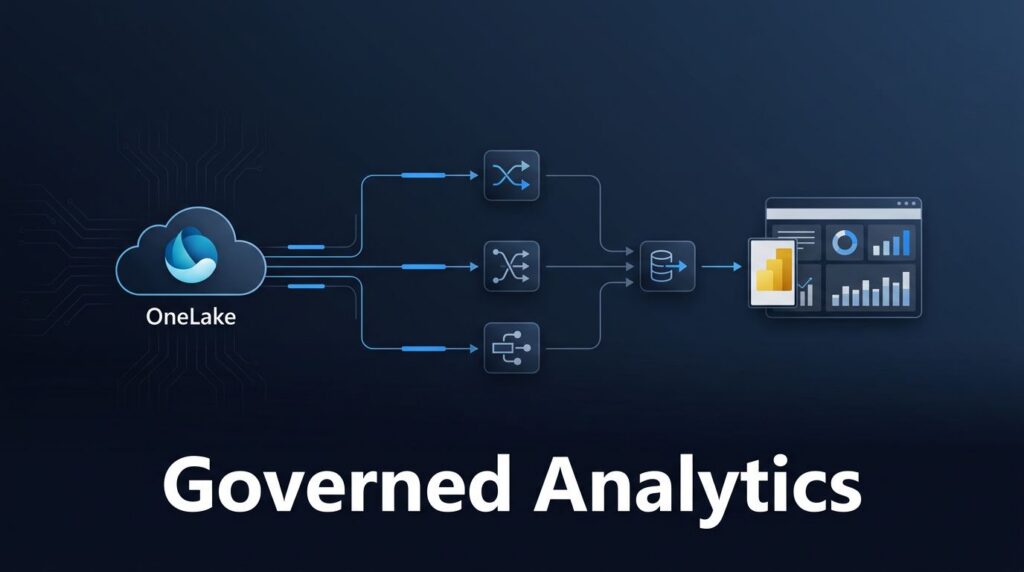
Every audit starts with the same pressure point: can your team explain where a number came from, how it changed, and who used it?
If that answer still lives in email threads, Excel tabs, and tribal knowledge, you do not have a reporting problem. You have a control problem. Microsoft Fabric data lineage gives you a usable map of sources, transformations, semantic models, and reports, which is exactly what compliance and change control need. By leveraging these visual insights, organizations can establish a robust framework for data governance, ensuring that every transformation is transparent and verifiable. Ultimately, this visibility is essential for building long-term data trust, as it proves to auditors and stakeholders that your reporting is accurate and secure.
Key Takeaways
-
- Comprehensive Visibility: Microsoft Fabric provides item-level lineage that maps the entire journey of data from raw ingestion in OneLake through transformations to final reporting, eliminating reliance on tribal knowledge.
-
- Simplified Compliance: Automated lineage tracking allows teams to generate a verifiable chain of custody for auditors, documenting data origins, transformation logic, and security access controls without manual documentation.
-
- Proactive Change Control: By visualizing upstream and downstream dependencies, teams can perform thorough impact analysis before modifying pipelines or schemas, significantly reducing the risk of downstream report failures.
-
- Governance Integration: Leveraging Microsoft Purview alongside Fabric enables centralized metadata management, allowing organizations to maintain consistent sensitivity labels and governance standards across the entire data estate.
What data lineage means inside Microsoft Fabric
In Microsoft Fabric, data lineage acts as a comprehensive trace of how information moves through your systems, detailing where data originated, how it was transformed, and which assets rely on it. By using the workspace lineage view, teams can visualize upstream and downstream dependencies for every asset, offering a clear map of how data flows from its initial ingestion to final reporting. Because Fabric consolidates engineering, warehousing, real-time analytics, and Power BI on a single SaaS foundation over OneLake, this item-level lineage provides a complete picture of your data ecosystem.
A typical pipeline might land a data source in a Microsoft Fabric Lakehouse, feed a Fabric Warehouse, and then support reports through semantic models without requiring data movement across disconnected tools. Because that entire chain exists within one platform, Microsoft Fabric Power BI integration is significantly easier to govern and explain.
Fabric becomes even more powerful when paired with Microsoft Purview. Through automated metadata scanning, Purview can analyze your entire Fabric tenant to harvest and aggregate metadata and lineage into a unified governance catalog. This provides teams with a centralized location to review how datasets, notebooks, warehouses, and reports relate to one another across the organization.
This capability extends far beyond traditional BI. If you plan to implement Copilot or Fabric data agents, your ability to provide trusted answers depends on verified source paths and shared business definitions. Maintaining clear lineage reduces guesswork before data ever reaches an executive dashboard, a Teams conversation, or an AI-generated summary.
Why compliance teams care about lineage
Compliance teams rarely struggle because data exists. They struggle because nobody can show the full chain of custody fast enough. Auditors want to see the origin of a data source, transformation logic, access controls, and downstream use. Lineage turns that into visible evidence instead of a manual reconstruction exercise.
This is where effective data governance and Microsoft Fabric governance become practical. By utilizing a medallion architecture, teams can structure data as it flows from the raw layer through to refined business insights. Because this movement is tracked, you can implement robust security measures like role-based access, row-level security, and column-level security. Furthermore, Microsoft Purview integration allows you to apply sensitivity labels that persist as information moves through the platform.
A strong example comes from a mid-size US Pension fund. The company used Fabric to mask regulated and personal data during ingestion, storing these secured assets within a Lakehouse. This allows downstream users to work with safer data earlier in the process. That approach is much easier to defend when teams can use column-level lineage to trace exactly which tables, notebooks, models, and reports consume the masked data.
Metadata also matters. A useful metadata-driven lineage guide shows why automated lineage becomes part of daily control work, not a last-minute spreadsheet before an audit.
For healthcare, financial services, education, and manufacturing teams, that shift is huge. Instead of proving compliance by hand, they can point to a living record inside the platform that clearly demonstrates how information is managed and secured throughout its lifecycle.
Change control gets easier when dependencies are visible
Most report failures do not start in the report. They start when someone renames a column, changes a data pipeline, swaps a source, or updates a model without checking for potential breakage. Microsoft Fabric data lineage helps teams map upstream and downstream dependencies to perform thorough impact analysis before a release breaks finance reporting on Monday morning.
If a team cannot trace downstream impact before a change, it does not have real change control.
That is why lineage matters so much during platform work. A schema change in a dataflow Gen2 implementation can affect curated tables, a semantic model, refresh jobs, and embedded reports. By using the lineage view, engineers can visualize these connections to test changes against known dependencies instead of guessing. Implementing standards like OpenLineage further helps maintain this transparency across complex environments.

This becomes even more important during Microsoft Fabric migration projects. Many companies want to migrate to Microsoft Fabric without rebuilding years of reporting logic. In a Power BI to Microsoft Fabric migration, lineage helps you identify which datasets are safe to move first, which workspaces need cleanup, and where old refresh chains are hiding.
It also helps with Power BI semantic model optimization. A model may appear inefficient, but changes to relationships or measures can still break dozens of downstream reports. With clear visibility into the data architecture, teams can optimize with significantly less risk.
Real-time workloads raise the stakes. Fabric Real-Time Intelligence can feed live dashboards and alerts, but live data still needs control. If an event schema changes at noon, operations teams need to know which downstream actions, reports, or warehouse tables could fail right after. If you are dealing with a legacy BI estate, Plan Your Power BI to Fabric Migration before you move critical assets.
What a reliable lineage setup includes
Lineage tools cannot fix messy data ownership on their own. Teams still need consistent naming standards, well-defined workspace boundaries, shared metric definitions, and a clear path from raw to curated data. Without these, the map exists, but nobody trusts the story it tells.
A robust foundation starts with how you organize your OneLake storage. By leveraging a shortcut chain to connect data, you can reduce shadow extracts and create a cleaner chain of custody. This approach is central to effective data platform modernization and analytics modernization, as it relies on a unified catalog that ensures all stakeholders see the same data context. To keep this environment accurate, teams must prioritize metadata scanning to maintain a single source of truth across the entire Fabric tenant.
These are the control points that matter most for tracking metadata and lineage:
| Area | Typical change | What lineage helps you see |
|---|---|---|
| Data Factory pipelines | Source, schedule, or mapping updates | Downstream item-level lineage and impacted reports |
| Dataflows Gen2 | Transformation or schema edits | Object-level lineage of curated datasets and refresh chains |
| Data Warehouse | Table structure or permission changes | Dependent BI assets and security access impact |
| Power BI items | Metric, relationship, or refresh changes | Report trust, performance, and end-user impact |
This discipline also supports Microsoft Fabric performance optimization and Microsoft Fabric capacity planning. When you understand which workloads are active, duplicated, or poorly designed, you can tune refresh patterns, shrink waste, and spend capacity where it matters. If you are still assessing your current gaps, request a Fabric Readiness Assessment or Optimize Fabric Performance and Cost.
For teams formalizing their internal controls, this Fabric governance guide is also helpful background reading.
Why Spargent Analytics fits US compliance and modernization work
US mid-market and enterprise teams often do not need a massive consulting program. They need senior delivery that can design, build, migrate, optimize, and support Fabric without adding layers of overhead. Spargent Analytics is a specialist Microsoft Fabric implementation partner built for that job.
Built for US companies. Delivered by senior Microsoft Fabric experts from Europe. That EU-to-USA delivery model gives clients experienced engineering depth, clear communication, and a better cost structure than many US-only consulting models. It works well for companies that already have internal analysts and need extra senior help, and for firms that do not have an internal data team at all.
Spargent provides Microsoft Fabric consulting, data engineering, and analytics services across the full lifecycle. That includes ingestion design, Fabric Data Factory consulting, Dataflows Gen2 implementation, and Microsoft Fabric Lakehouse architecture.
We specialize in building a high-performance Data Warehouse, managing every data pipeline, and ensuring your Power BI items are audit-ready within a unified catalog. Our expertise covers OneLake consulting, Fabric semantic models, and Microsoft Fabric Power BI integration. We also provide Microsoft Fabric managed services after go-live, including platform support, tuning, and change management.
If you are comparing Microsoft Fabric consultants, looking for a single Microsoft Fabric expert, or reviewing data engineering consulting options, focus on business outcomes. By leveraging clear lineage, we help organizations achieve scalable self-service reporting, reducing dependency on fragile, manual processes. We prioritize workspace organization, less Excel rework, better-governed pipelines, and stronger ROI from Microsoft 365, Azure, and Power BI. Spargent is built for Microsoft Fabric consulting needs, with delivery tailored to US buyers, time zones, and reporting requirements. When you are ready to map the next step, Book a Microsoft Fabric Discovery Call.
Frequently Asked Questions
How does Microsoft Fabric lineage differ from manual documentation?
Manual documentation is often fragmented across spreadsheets and emails, making it difficult to maintain as data environments evolve. Fabric provides a living, automated record that reflects real-time architectural connections, ensuring that the documentation is always accurate and synced with the platform’s actual state.
Can Fabric lineage help during a migration from Power BI?
Yes, lineage is essential for migration projects as it helps identify which datasets and workspaces are active and which are obsolete. It allows engineers to map out dependencies, ensuring that critical reporting logic remains intact while migrating legacy structures to the Fabric environment.
How does lineage improve organizational trust in AI and Copilot features?
AI-generated summaries and Copilot insights are only as reliable as the data they consume. By verifying source paths and maintaining clear lineage, teams can ensure that the outputs are grounded in trusted, governed data, which reduces the risk of generating inaccurate business insights.
Does lineage tracking impact system performance?
Fabric’s built-in lineage features are designed as a core component of the SaaS platform, allowing for visibility without requiring separate, resource-intensive monitoring tools. This allows teams to analyze their environment and optimize performance, such as identifying redundant data pipelines, without compromising the speed of their production workloads.
Conclusion
If you cannot trace a number, you cannot control the reporting behind it. Implementing Microsoft Fabric data lineage is what turns your workspace from a collection of workloads into a governed operating system for compliance and change.
For US companies modernizing analytics, this means fewer blind spots, safer releases, and stronger confidence in every report. With the right Fabric partner, you can put these essential controls in place while building the foundation for long term data trust without the need to manage a massive in house data team from the start.
