
A well-organized OneLake allows teams to work efficiently and trust their data. Without proper organization, every new workspace, shortcut, or semantic model brings friction that slows down the entire data estate.
Effective OneLake data governance begins with establishing a clear structure rather than focusing on cleanup. When multiple teams store data without defined rules, disorganization quickly outpaces any policy efforts.
Microsoft Fabric provides the necessary building blocks for success. The primary challenge is determining how teams should use these tools to maintain a clean and collaborative environment.
Key Takeaways
- Prioritize Structure Over Cleanup: Establishing a clear, domain-driven hierarchy (Tenant > Domain > Workspace) is essential to prevent OneLake from becoming a cluttered shared drive as data volume grows.
- Standardize Data Lifecycle Layers: Separate your data into distinct raw, curated, and team-ready zones to improve security, simplify change control, and encourage the reuse of validated assets.
- Leverage Zero-Copy Sharing: Use OneLake shortcuts to connect to existing data sources instead of creating redundant copies, reducing storage waste and ensuring a single version of the truth.
- Enforce Governance at the Consumption Layer: Governance must extend beyond storage to include semantic models, reports, and dashboards to ensure consistent business logic and user trust.
- Define Clear Ownership: Assign specific owners to every domain and workspace to maintain accountability for security reviews, data quality, and asset lifecycle management.
Why OneLake governance breaks down without a shared operating model
OneLake is included with every Microsoft Fabric tenant eliminating the need to provision storage accounts, manage Azure resource groups or configure separate services. Fabric workloads such as Data Factory, Data Engineering, Warehouse, Power BI, and Real-Time Intelligence use by default a unified storage foundation. While this simplicity is beneficial, it also introduces risks: if each team builds independently, the platform can become a crowded common drive.
Most governance issues stem from design flaws rather than security vulnerabilities. Examples include workspaces without owners, lakehouses mixing raw files with report-ready tables, multiple teams duplicating the same customer table, and inconsistent business definitions between Power BI models and underlying warehouse tables. These issues erode trust and often lead teams to revert to Excel for reporting.
Effective Microsoft Fabric governance addresses these issues proactively. Begin by establishing platform rules that align with business operations. Prioritize domain ownership, workspace purpose, naming standards, and approval processes for new shared assets over lengthy policy documents.
Fabric supports a data mesh style of ownership, allowing for distributed governance where domains keep responsibility for their data while still operating inside one logical lake. Teams in different regions can work in separate workspaces, yet still stay inside the same governed environment.
If your environment already includes numerous PowerBI workspaces, data extracts, and ad hoc pipelines, pause before expanding further. Conducting a short assessment can prevent extensive rework. A fabric readiness assessment inventories existing workspaces and data products, identifies key pain points and risks, and uncovers governance gaps that may impact scalability. This process helps leaders identify areas for improvement before making additional investments. If you plan your target state, Request a Fabric Readiness Assessment before adding more data products to OneLake.
To begin, form a small cross-functional team with representatives from key business domains and IT. Appoint a project lead, ideally a data platform owner or senior analyst familiar with both the business and Microsoft Fabric. Use tools such as Microsoft Purview or the OneLake catalog to map existing assets, document ownership, and identify items requiring review.
Start with a simple inventory spreadsheet or a built-in governance dashboard. Within two weeks, you should have a clear list of current workspaces and data products, a summary of critical issues, and actionable recommendations for next steps. These actions provide rapid visibility and help leadership prioritize immediate improvements before broader governance initiatives or migrations.
Design domains and workspaces around real business ownership
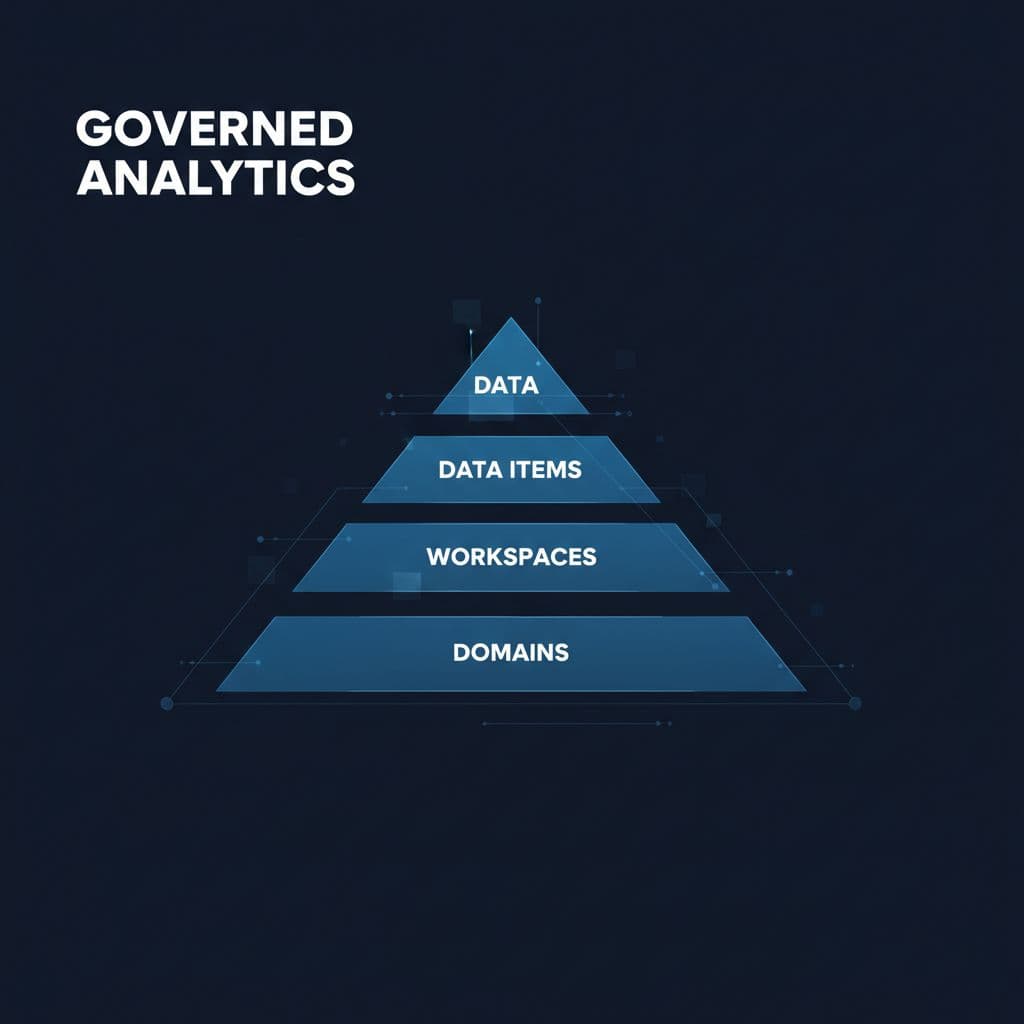
The simplest OneLake structure is still the best one: tenant at the top, then domains, then workspaces, then data items such as lakehouses, warehouses, shortcuts, notebooks, pipelines, and semantic models.
Domains should align with stable business functions rather than temporary organizational structures. Examples include Finance, Sales, Operations, HR, Supply Chain, or Patient Services, as these areas correspond to consistent data ownership. Fabric administrators should configure the domain selector to facilitate navigation across these boundaries.
Workspaces should be organized by team purpose, such as finance reporting, budget planning, or source-system ingestion. In cases where data assets span multiple domains, assign joint stewardship or establish clear shared ownership policies to maintain transparency and governance. To ensure ownership is clear and actionable, organizations should maintain an official register of domain and workspace owners, send automatic reminders for regular reviews, and establish a governance committee to periodically audit ownership and accountability. These measures help operationalize accountability and ensure that each domain has an engaged owner.
This is the model to aim for:
| Level | What it should represent | Primary owner |
|---|---|---|
| Tenant | The whole company data estate | Central platform team |
| Domain | Business area with clear accountability | Domain owner |
| Workspace | Team, product, or use case | Workspace owner |
| Data item | Lakehouse, warehouse, model, or pipeline | Data product owner |
This structure is intentionally simple, which enables scalability.
Build workspaces around purpose, not convenience
A common mistake is creating a single workspace per department and consolidating all assets within it. Initially, this may seem effective, but over time, raw ingestion, transformation logic, semantic models, and team experiments become mixed. This leads to complex permissions and a loss of release control.
Instead, assign each workspace a specific purpose. For example, separate workspaces for Finance-Ingestion, Finance-Curated, and Finance-Reporting are easier to manage than a single large Finance workspace. This approach supports clear ownership while supporting collaboration.
Standardized naming conventions also benefit OneLake. Use clear, descriptive patterns so that the purpose of each asset is immediately apparent, such as ‘Sales-Curation Lakehouse’ or ‘Enterprise-Reporting Warehouse.’ This practice improves searchability, support, and audit processes.
Keep ownership visible
Each domain and shared workspace should have an assigned owner, steward and a documented purpose. Without clear ownership, critical tasks such as access reviews, refresh monitoring and asset maintenance are neglected.
The owner is responsible for the overall health and security of the data asset, including decisions on access, lifecycle and use.
The Steward manages daily operations, including monitoring data quality, maintaining documentation and supporting compliance. For example, a Finance Workspace owner may approve membership, while the Steward ensures that datasets are refreshed and accurately labeled. Defining these roles clearly helps leaders assign responsibilities and prevents oversight gaps.
Data owners should utilize the OneLake catalog to maintain oversight of their respective areas. By navigating to the Govern tab, users can monitor the health of their data estate and assess compliance across different domains. The OneLake catalog serves as a central hub for tracking assets and ensuring they remain reliable.
If you need to search for specific data assets or understand their lineage, use the Explore tab to gain visibility into how your information is being used. Microsoft provides detailed insights within these tools, including recommended actions that show where your governance posture needs work. Consistently reviewing these items helps teams differentiate between what is trusted, what is sensitive, and what should be retired to keep the environment clean.
Separate raw, curated, and team-ready data before access gets complicated
Security measures alone are not sufficient for a disorganized data lake. Implementing layers that correspond to the data asset lifecycle is essential.
For most mid-market and enterprise teams, three layers work well. First, land source data in a raw area. Next, clean and standardize it in a curated area. Then, publish team-ready data products for reporting and applications. This pattern works whether the source comes from pipelines, mirroring, eventstreams, or shortcuts.
Raw data should stay close to the source. Keep transformations light there. Curated data is where business rules belong. That is also the best place to create reusable conformed tables, such as customer, product, date, site, or account. Effective metadata management ensures these core data assets remain consistent across the organization. Team-ready data products then support a specific business outcome, such as finance close reporting or store inventory analysis.
This separation simplifies governance in several ways. First, it allows for secure management of raw data containing PII or operational details. Second, analysts benefit from a cleaner and safer workspace. Third, change control is enhanced because business logic is centralized rather than dispersed across multiple report models. Fourth, data reuse increases as teams access shared curated layers instead of creating private extracts.
Microsoft Fabric supports this design well. Data pipelines and mirroring handle ingestion. Data engineering notebooks and SQL endpoints refine data. Dataflows Gen2 implementation can help for lighter transformation patterns and business-owned prep. A Microsoft Fabric Lakehouse often fits raw and curated zones, while a warehouse can support governed SQL-first reporting. In many environments, the best answer is both.
At this stage, consulting services for Fabric Data Factory and Microsoft Fabric data engineering are valuable. The technical challenge extends beyond data movement to include determining where each transformation should occur, its frequency, and post-deployment support responsibilities.
Use security, labels, and catalog rules that people can follow
Multi-team governance fails when access rules are complex and hard to maintain. Focus on a simple, repeatable model.
Start with the least privilege. Implement a strong access control strategy by assigning permissions through OneLake security roles rather than managing users one by one. Let workspace permissions handle broad collaboration, then use data plan security for the data itself. Fabric can enforce access across compute engines, which is important because the same data might be touched through Spark, SQL, KQL or Power BI. Utilizing row-level security and column-level controls is essential when departments share the same tables but should not see the same records.
Microsoft’s OneLake security best practices are worth following, especially for primary source workspaces and fine-grained controls. Pair that with the broader Fabric data security overview so teams understand where workspace permissions end and data-plane security begins. By leveraging Microsoft Purview, you can ensure that these security standards are applied consistently across your entire estate. However, it’s important to be aware of some current limitations in the governance tooling. For example, certain access controls and audit capabilities in Fabric and Purview are still maturing, and not all metadata or sensitivity labels may sync seamlessly across products yet. Integration between Purview, Fabric workspaces, and the OneLake catalog continues to improve, but some cross-environment lineage tracking and automated policy enforcement may require manual setup or frequent review. Make sure to review the latest Fabric and Purview roadmaps, and plan for occasional workarounds or custom monitoring during initial rollouts.
If unrestricted workspace creation and access granting are allowed, governance will fail well before any audit occurs.
Sensitivity labels are also important. Apply labels such as public, internal, confidential, or highly restricted to data items and models, not just files, to align with data loss prevention policies.
The catalog side matters just as much. The Purview Unified Catalog provides endorsed datasets, lineage, ownership metadata, and refresh status to help teams choose the right asset. When you use the features within Microsoft Purview to organize your data, you prevent users from building redundant copies. Otherwise, they build another silo, which is exactly how OneLake slowly reverts to the old data sprawl problem it was supposed to eliminate.
Cross-tenant sharing is also part of governance now. Fabric can share governed data across tenant boundaries without copying it. That is useful for holding companies, acquired entities, or partner reporting, but only if ownership and labels are already clean inside your tenant.
Share data with shortcuts instead of multiplying copies
If multiple teams require the same data, avoid creating redundant copies unless there is a legal or performance requirement. Use shortcuts whenever possible.
OneLake shortcuts give zero-copy access to external or internal data. That includes ADLS, Amazon S3, Google Cloud Storage, and other Microsoft Fabric locations. For a multi-team setup, this is one of the most useful design choices in the platform. It reduces storage waste, cuts duplicate pipeline work, and keeps governance attached to a smaller number of trusted sources. Furthermore, by centralizing access, you simplify data lineage, allowing teams to trace the origin of information without needing to replicate files across different environments.
Shortcuts also facilitate a better data discovery. Instead of searching through siloed storage accounts, users are able to navigate a unified OneLake structure to find the assets they need. This becomes particularly vital during a transition. Many firms do not need to move every file on the first day when they migrate to Microsoft Fabric from a mixed estate of Azure, on-prem and third-party platforms. They can connect existing data, prove reporting value, and then decide what should land in OneLake later. This approach lowers risk significantly.
However, shortcuts do not eliminate the need for proper governance. If the source data lacks clear ownership, appropriate naming, or contains sensitive fields, the underlying issues remain. Governance must begin with ownership and publishing rules. Effective data discovery requires thorough documentation of shortcuts so downstream teams can identify and trust shared assets.
For shared business data, publish once from the curated layer, then let downstream teams consume through approved objects. That might be a lakehouse table, a warehouse view, or a semantic model. The point is consistency. Analysts should not wonder which customer table is the right one.
This is where OneLake consulting often matters more than code. The biggest decision is not how to connect the source. It is deciding which data stays local, which data is shared, and where business definitions become official.
Govern the layer people actually use: models, reports, and real-time data analysis
Most business users interact with reports, dashboards and applications rather than with raw tables. Thus, governance must extend to the consumption layer.
For many companies, the biggest gap is between warehouse logic and BI logic. A curated table may be right, yet the report still shows the wrong number because definitions drifted within multiple models. That is why semantic models need ownership, version control, refresh rules and naming standards, just like pipelines do. To manage this effectively, you should use the Govern tab in Microsoft Fabric to monitor your assets and retain control over your data environment.
This matters even more in the Microsoft Fabric Power BI integration. PowerBI is no longer a separate reporting island when it sits on the same foundation. A model can point to governed OneLake data, reuse the lineage and reduce duplicate imports. That’s good for trust and good for speed. To ensure that users rely on the correct data, you should enforce a consistent endorsement status across your organization, making sure only high-quality assets are certified and promoted for broad use.
If you are planning a Power BI to Microsoft Fabric migration, approach it as a design change rather than a simple license update. Review workspace sprawl, report dependencies, shared datasets, refresh schedules, and model sizes, and align these with capacity planning and performance optimization. Otherwise, existing issues will persist in the new platform.
Tip: Prioritize migration by focusing first on workspaces and datasets that are both business critical and frequently used. Identify reports and data products that drive the most value, support daily operations or have executive visibility. Deal with these high-impact items early in the migration to reduce risk and guarantee a seamless transition. Less critical or infrequently used assets can be scheduled for later phases, archived or retired, as needed. This approach assists leaders in allocating resources optimally, avoiding unnecessary disruption, and ensuring core business functions are maintained during migration.
A senior expert typically begins by identifying which semantic models are business-critical, which can be retired, and where optimization can reduce inefficiencies. Often, faster reporting results from fewer models, optimized DAX, improved incremental refresh, and better source layering rather than increased capacity.
The same principles apply to Real Time Intelligence. Streaming and event data require defined ownership, retention policies, alert logic, and a clear transition to reporting. Without governance, live data leads to confusion rather than insight.
If you want a structured review of legacy Power BI, shared datasets, and workspace design before you move, Plan Your Power BI to Fabric Migration or Optimize Fabric Performance and Cost.
To focus on migration and ease your transition, start by inventing your current assets and grouping them: migrate critical reports and models that drive core business processes first, identify redundant or outdated assets for archiving, and mark legacy items for potential retirement.
Focus on high-value, frequently used data products and workspaces, and address dependencies to reduce disruption. This approach helps leaders ensure essential business functions are maintained, reduces migration risk, and prevents unnecessary clutter from being moved into the new environment.
How Spargent helps US teams build governed Fabric faster
Many US companies recognize the need for improved governance, but often lack the senior capacity to implement it. They require platform design, migration, tuning, and support without the need to hire a full internal team.
Spargent Analytics is a specialist Microsoft Fabric implementation partner for mid-market and enterprise teams that want practical results. Our expertise includes comprehensive consulting services, data engineering, and managed services that cover the full data lifecycle. We assist with everything from ingestion and pipelines to Dataflows Gen2 implementation, lakehouse design, semantic modeling, and long-term governance. By providing dedicated administrative monitoring and expert support for Fabric admins, we ensure your environment remains stable and secure.
For organizations that evaluate consultants, the delivery model is important. Spargent is designed for US companies and delivered by senior experts in Europe. This EU-to-USA approach provides experienced engineers, effective communication, and a more competitive cost structure than many local models. It is well-suited to teams striving to accelerate reporting, eliminate manual Excel workflows, and improve their internal data culture. Our approach helps you achieve higher ROI from your Microsoft 365, Azure, PowerBI, and Microsoft Fabric investments.
We deal with complex tasks that teams often postpone. Spargent provides end-to-end Microsoft Fabric migration, PowerBI transitions, capacity planning, performance optimization, and comprehensive OneLake consulting. Whether you need guidance on your enterprise data estate or help building a strong business glossary, our senior consultants align business ownership with technical design. We focus on delivering sustainable outcomes, rather than relying on junior staffing.
Ultimately, this work focuses on the complete data platform modernization. A well-architected Microsoft Fabric deployment reduces duplicate reports, accelerates time-to-insight, improves cost control, and minimizes the dependence on manual processes. Leaders seeking to initiate governance improvements can access resources such as self-assessment checklists, workspace inventory templates, and governance planning guides to benchmark their environment and identify priorities. These tools allow teams to map ownership, review data quality, and begin improvements before seeking external assistance. If you need help selecting the right governance model for your Microsoft Fabric environment, Book a Microsoft Fabric Discovery Call or Contact us for any Microsoft Fabric needs.
Frequently Asked Questions
How does a domain-driven structure improve OneLake governance?
A domain-driven approach maps your data architecture to real-world business units like Finance or HR rather than technical org charts. This clear alignment makes it easier to assign accountability, manage specific access requirements, and prevent workspace sprawl.
Why should I separate raw data from curated data?
Separating data into raw, curated, and team-ready layers allows you to apply appropriate security controls and transformation logic at each stage. This ensures that raw data remains untouched while analysts and report builders work exclusively with reliable, standardized datasets.
What are the advantages of using shortcuts in Microsoft Fabric?
Shortcuts provide a way to access data across multiple locations without moving or duplicating files. This architecture significantly lowers storage costs, reduces the complexity of the data lineage, and allows teams to share trusted assets instantly across the organization.
How can I ensure users are using the correct data assets?
Utilize the OneLake catalog and Microsoft Purview to promote and certify high-quality assets. By enforcing naming standards and providing clear visibility into ownership and refresh status, you guide users toward trusted, endorsed data rather than private, redundant extracts.
Conclusion
A well-managed OneLake is more than a renamed folder structure; it represents a shared operating model for data, ownership, and trust.
Teams that maximize the value of Microsoft Fabric maintain a simple design. They organize by domain, separate raw and curated data, and publish trusted assets once. By using the OneLake catalog for visibility and the Govern tab to enforce consistent policies, these teams ensure that OneLake data governance accelerates reporting rather than hindering it. Prioritizing governance of frequently used models enables organizations to realize the full benefits of a unified data estate.
